
Continuing our theme of running large language models (LLM) locally on your PC for freei; in this post we build upon the local AI chatbot from part 1, improving the responses by retrieving data to make it more knowledgeable. To do this, we use a technique called retrieval augmented generation (RAG), that adds data to the prompt before it goes to the model.
Conventional wisdom says RAG is a magic bullet that stops LLMs from going off topic, and eliminates hallucinations. But, is this really true?
Let’s explore further by diving into how RAG works, and run a simple demonstration.
First, a recap on what is sent into an LLM. What you type in is just the tip of the iceberg (above the line):

And all of this goes into the LLM, an inscrutable black-box, and out pops a response:

RAG, the purple box on the left, feeds additional data into the LLM to help reduce uncertainty. This improve the likelihood that the model gives coherent and accurate responses.
You may be wondering why bother with the model at all, when RAG has already answered the question in the example above. While that may be true in this example, there may be cases where you need a model to interpret multiple items that come back from RAG, and synthesise them into a coherent response.
How RAG Works
RAG (generally) uses a special database, called a vector database, to retrieve similar knowledge to what the user has written in their prompt. Ideally, this helps lower uncertainty for the model, and this reduces hallucinations and helps surface knowledge that it wasn’t trained on.
A vector database is kind of like a fuzzy search, but the details of how it works is a topic for another post. For now, let’s assume that a vector database retrieves chunks of data similar to the user’s query. This data is combined with the original prompt before it goes to the model.
Here is a simplified diagram of a Q&A chatbot enhanced with RAG:

Note how RAG data is retrieved from the vector database, then a system prompt is added too.
Putting RAG to the Test
To test out the concept, we build a simple lab in Docker. Note that this is not suitable for production use.
For the lab, you need a Linux machine with git and docker installed and a bit of patience, especially if you do not have a GPU (I don’t).
First, clone the repo from https://codeberg.org/mattjhayes/RAG-Enhanced-Chatbot-Example. Start by having a look through it first to understand what it does.
The docker-compose.yaml file builds three containers:

The containers are connected to each other with a private network. Scripts in the Python container use Chroma as a vector database, and Ollama for running models.
In a suitable directory, run this command to clone the repo:
git clone https://codeberg.org/mattjhayes/RAG-Enhanced-Chatbot-Example
Navigate into the new sub-directory and start the containers:
cd RAG-Enhanced-Chatbot-Example/
docker compose up
After the containers have finished coming up, in a separate terminal window, attach to the ollama container:
docker exec -it ollama-container /bin/bashIn ollama-container, pull the models we need for chatbot and to create the RAG embeddings (beware, this will download a lot of data, and may take a long time. It may help to stop and reattempt if stalled):
ollama pull llama2
ollama pull llama3.2:1b
ollama pull gemma2:2b
ollama pull llama3.2:3b
ollama pull mxbai-embed-large
For this tutorial, we use a fictional company called BlueWombatSampleNet that provides connectivity services for wildlife tracking. It is entirely made-up, so that we can guarantee the model has no prior knowledge of it as it was not in it’s training data. We thus need RAG to help the model with information it does not have.
The fictional company BlueWombatSampleNet comes up blank in a Google searchiii, which is a good start:

Staying in the ollama-container, let’s check behaviour of a model with no RAG.
ollama run llama2>>> What does BlueWombatSampleNet do?
BlueWombatSampleNet is a Python library for generating and manipulating synthetic data, specifically designed
for use in machine learning. It provides a variety of tools for creating and customising synthetic datasets,
including:
1. Data augmentation: BlueWombatSampleNet offers a range of techniques for transforming and modifying existing
datasets, such as rotation, flipping,^C
<snip>This out-of-the box behaviour is an example of what has become known as a ‘hallucination’, where an AI model makes up a response in the absence of a pre-trained answer. The company is entirely fictional, yet the model confidently gave us a bogus answer as to what it does. This result is worse than useless, but provides a starting point for us to refine from.
Now we add RAG. To do this, we run Python to build embeddings for our fictional company. Embeddings are mathematical expressions representing the pieces of knowledge that we want to be able to search by similarity. Think of them as metadata about meaning.
Open another terminal window and connect to the Python container:
docker exec -it python-container /bin/bash
Run this Python script:
python3 ingest.py
This script ingests our RAG demonstration data:
documents = [
  "BlueWombatSampleNet is a provider of connectivity services for wildlife tracking",
  "If the BlueWombatSampleNet modem has a red light and no blue light then ask the customer to press the FOO button",
  "If the BlueWombatSampleNet modem has no lights then ask the customer to check if it has power",
]
It creates an embedding per string, and load the strings along with their meanings encoded as vectors, into the Chroma vector database. This is a one-time activity.
In real life, you’re likely to be wanting to ingest documents like PDFs, but we’ll keep this scenario super-simple, and cover that in another post.
Running Tests
Now that we’ve done the vector database embeddings, we can run a model with RAG.
This script runs through multiple examples:
python3 query_examples.py
Here’s how the output looked for me (your results may differ slightly due to the inherent randomness of LLMs). First query, without RAG and no system prompt, hallucinates some slop:
Example without RAG and no system prompt
AI Model is gemma2:2b
User Query is:  What is BlueWombatSampleNet?
Response is:  BlueWombatSampleNet is a **large language model (LLM) developed by researchers at the University of California, Berkeley.**  It's known for its ability to generate high-quality outputs in various domains like:
* **Text generation:** Writing stories, poems, articles, summaries.
* **Code generation:** Creating code in different programming languages.
(response truncated for brevity)
This slop is expected behaviour, and serves to set a baseline that RAG can be judged against.
We can do better.
One benefit of running models locally is that we can set a system prompt. One downside of running models locally is that we can forget to set a system prompt! Most models are trained to expect a system prompt, and abide by it’s rules.
Let’s see what happens when we add a system prompt:
Example without RAG, and using System Prompt
AI Model is gemma2:2b
System Prompt:  You are an information verification assistant. Respond strictly using only the information provided. If a question requires external knowledge, or the answer is not directly found in the given text, reply exactly with:  "I don’t have that information." Never speculate or generate plausible but unverified content.
User Query is:  What is BlueWombatSampleNet?
Response is:  I don’t have that information.
This is better. Not hallucinating, but still no correct response.
Now we try RAG, but without a system prompt:
Example with RAG and no System Prompt
AI Model is gemma2:2b
User Query is:  What is BlueWombatSampleNet?
Context is:  BlueWombatSampleNet is a provider of connectivity services for wildlife tracking
Response is:  BlueWombatSampleNet is a company that provides connectivity services specifically for **wildlife tracking**.
They offer solutions designed to help researchers and conservationists monitor animals in the wild using technology like GPS trackers and other data-gathering devices.
Not bad, but it’s starting to elaborate into speculation…
Now finally, let’s try RAG and a system prompt:
Example with RAG, and using System Prompt
AI Model is gemma2:2b
System Prompt:  You are an information verification assistant. Respond strictly using only the information provided. If a question requires external knowledge, or the answer is not directly found in the given text, reply exactly with:  "I don’t have that information." Never speculate or generate plausible but unverified content.
User Query is:  What is BlueWombatSampleNet?
Context is:  BlueWombatSampleNet is a provider of connectivity services for wildlife tracking
Response is:  BlueWombatSampleNet is a provider of connectivity services for wildlife tracking.
Perfect.
A More Thorough Analysis
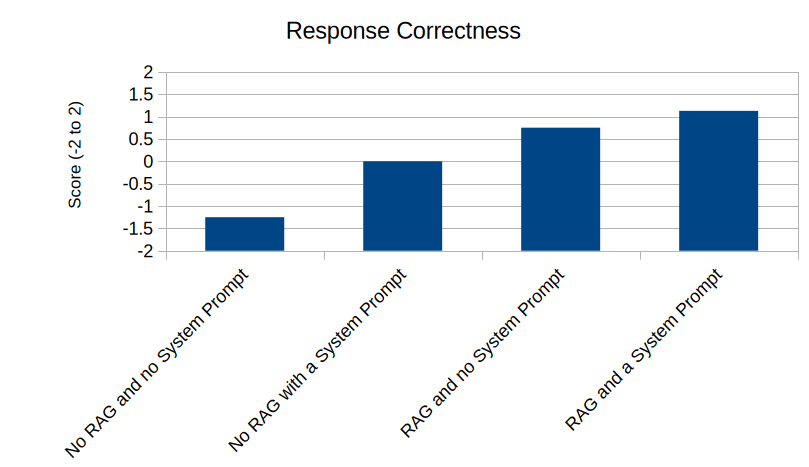
Using the included script query_tests.py, we run tests across 4 models, with 2 scenarios, and 4 permutations. Crunching the data from these tests, here’s what we find (not scientific, but near enough):
Minimising Hallucinations
While using RAG did reduce hallucinations, using a system prompt had the biggest impact:

Interestingly, the model used also had a significant impact, and out of the 4 models we tested Llama 3.2 (1 billion parameters) came out best:

Giving a Useful Response
The combination of RAG and System Prompt is best for providing a useful response to a valid query:
Wrapping it up
In this post we showed that RAG can useful, but combining it with a good system prompt gives the best chance of (mostly) keeping the chatbot on-topic and reducing hallucinations. RAG is not a silver bullet to fix all the ills of AI, but it can help in a knowledge chatbot use case.
We also showed the choice of model is important to getting a good outcome. This makes intuitive sense when considering that the model *is* the chatbot, and prompting techniques like RAG are merely an indirect method of attempting to control it.
Keeping an LLM under control in the face of random and potentially malicious user input is like trying to ride horseback with no reigns, steering only by whispering instructions in the horse’s ear. When you’re used to the predictability of driving a car, you may find this unsettling and a bit odd. Results will vary.
We’ve only just scratched the surface of RAG in this post with our trivial example. Time permitting, the next post on this topic will go deeper into the hard problem area of ingesting data into RAG, and tuning it to work effectively.
Footnotes
i Free, but you pay for your own power…
ii Example fact chosen randomly from Wikipedia. https://en.wikipedia.org/wiki/Eois_nigricosta
iii As this blog post will be indexed by Google, there is a small chance that future models may include this blog post in their training. If they do, just invent another fictional company and update the Python scripts.
 Bits 'n Bytes
One thought on “Putting the Open back in AI: RAG”