
Did you know that you can run large language models (LLM) locally on your PC, free from the walled gardens of Big Tech? There are good reasons to do this. To start with, it’s a great way to keep your data local so it remains private. It also decentralises AI, fighting against the concentration of power into a few big playersi. Better yet, you can do all this for free…ii
In this post, we use the free and open-source Ollama platform to run LLM chatbots on a Linux desktop. Ollama could alternatively be installed on Windows or macOS.
Ollama is an AI model runner. This means it can run multiple AI models, controlling their tuning and execution. Ollama has a library of models for different use cases, including vision and thinking. It has a REST API to integrate your code against and libraries for Python and JavaScript.
Installation
For reasons of portability and containment, we will run Ollama in a Docker container. Alternatively, you could download and install the application from the Ollama website.
Pre-Requisites
Start by making sure your Linux PC is up to date, and has docker installed. Your system needs at least 8GB of RAM, but 16GB would be better. The instructions below are for a standard PC, with no graphics processing unit (GPU).
Run Ollama in a Container
In a terminal window, run docker to pull the official Ollama image (single line, beware line wrap):
docker run -v ollama:/root/.ollama -p 11434:11434 --name ollama ollama/ollamaNext, we use Ollama to run a basic 7 billion parameter foundation model called LLaMa 2. Note that Ollama will pull a lot of data first time to download the model.
At the container prompt, type:
ollama run llama2Ollama will download the weights biases for a model the first time you run it. Something like this:
pulling manifest
pulling 8934d96d3f08: 100% ▕████████████████████████████████████████████████████████▏ 3.8 GB
pulling 8c17c2ebb0ea: 100% ▕████████████████████████████████████████████████████████▏ 7.0 KB
pulling 7c23fb36d801: 100% ▕████████████████████████████████████████████████████████▏ 4.8 KB
pulling 2e0493f67d0c: 100% ▕████████████████████████████████████████████████████████▏   59 B
pulling fa304d675061: 100% ▕████████████████████████████████████████████████████████▏   91 B
pulling 42ba7f8a01dd: 100% ▕████████████████████████████████████████████████████████▏  557 B
verifying sha256 digest
writing manifest
success
>>>
If your download slows to a crawl, try stopping it with CTRL+C, then running it again. It should resume the download from the same point and in my experience will go faster.
Let’s see how LLaMa 2 is at telling jokes:
>>> Tell me a good joke


Sure, here's a classic one:

Why don't scientists trust atoms?
Because they make up everything!

I hope you found that amusing! Do you want to hear another one?
To end your session with the model, type /bye:
>>> /byeThe joke may be a bit lame, but we should acknowledge that LLaMa 2 is a low-spec model from 2023. And we just ran it locally on your PC, and for free. Thanks Meta for open sourcing itiii. Note that there are more advanced models available to play with, but some of them will require more resources to run.
You can stop the container with:
docker stop ollamaIf you come back later and need to relaunch the container, do this:
docker start ollama
docker exec -it ollama /bin/bash
Then re-launch the model:
ollama run llama2How does it work?
Here is a simplified diagram of how Ollama and it’s AI model runs in your PC:

Figure 1 – How Ollama and the LLM run in the host machine
The LLM model uses many layers of artificial neurons, in a structure called a feed-forward network (FFN), to calculate the next word (or token) of their output. Each neuron has a set of weights and a bias that were set during training, and an activation function calculates the output(s):
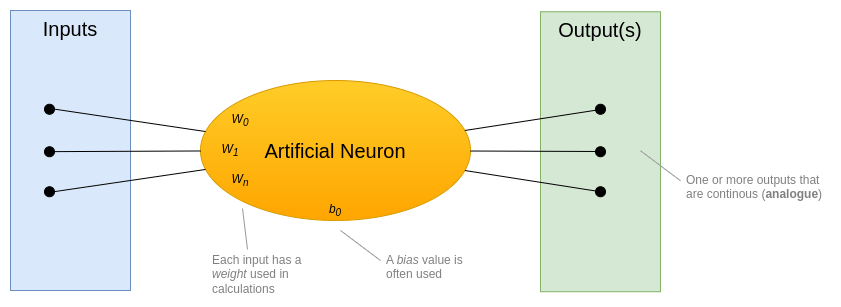
Figure 2 – How an artificial neuron works
The Llama 2 model we ran has 7 billion parameters. This is the total number of weights and biases used in the model. Running calculations over this many parameters to generate each word is very intensive on the host computer.
When you run System Monitor on your PC while a response is being generated, you’ll likely see a significant spike in CPU. Here’s an example from my sans-GPU PC:
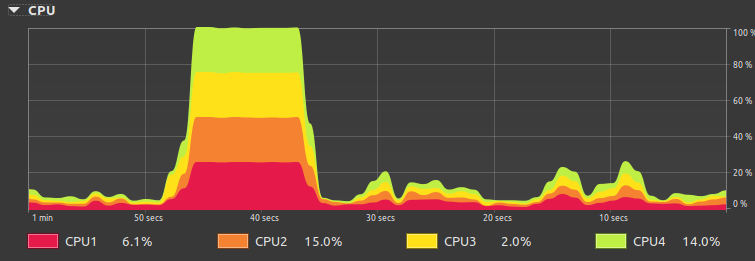
Figure 3 – Example of high-CPU during LLM output generation
If my PC had a GPU, there would have been far less hit on the CPU, and less lag in the model’s output. This is because GPUs have a high number of processors allowing them to run many math calculations in parallel, which improves performance.
For production use cases you need the speed and efficiency of GPUs, but for basic experiments and learning then running on CPU is just fine.
Wait, there’s an API!
Ollama comes with an HTTP API that by default listens on TCP port 11434. Let’s use Python to try out the API.
In a separate terminal window start a Python virtual environment and use pip to install the ollama Python module:
pip3 install ollamaStart Python interpreter:
python3Paste in this Python code and hit enter a few times:
import ollama
response = ollama.chat(model='llama2', messages=[
  {
    'role': 'user',
    'content': 'why is the speed of light constant?',
  },
])
print(response['message']['content'])
Our prompt poses a harder question, so be patient waiting for the response. Or write a simpler prompt. After a while you should see the LLM’s response appear. Something like this:
The speed of light is considered a fundamental constant in physics because it has been consistently measured to have the same value in all inertial reference frames. This means that the speed of light is the same for all observers, regardless of their relative motion or position. This property of the speed of light is known as the "constancy of the speed of light." <snip>Hopefully this shows how easy it is to write code to interface with Ollama and run models.
Taking it further
We can do a lot more with Ollama. It supports fine tuning of models, leveraging knowledge from documents using Retrieval Augmented Generation (RAG), and models that do “thinking”.
My next post in this series covers a basic introduction to RAG
Wrapping it up
In this post we introduced the open source Ollama platform, and did a basic demonstration of using it to run an LLM chatbot and integrated to it via REST API using a Python library. Have fun experimenting…
Footnotes
i Decentralising AI will help prevent AI monopolies and avoid the concentration of power to a limited set of tech oligarchs/companies. It will also help ward off massive infrastructure issues, exemplified by Sam Altman’s ask for 5 Gigawatt data centres https://fortune.com/2024/09/27/openai-5gw-data-centers-altman-power-requirements-nuclear/
ii To be fair, nothing in life is truly free. There’s the cost of your time, plus the electricity to run your PC…
iii Meta’s motives for open sourcing their AI models are a bit murky. It has been suggested that this was a strategic move to hurt their competitors who hope to monetise their AI models. Here’s a good post on it: https://dev.to/nanduanilal/metas-open-source-ai-ambitions-554a
 Bits 'n Bytes
Nice! Using the API in traditional programming is one of my favorite things lately. Have fun!
LikeLiked by 1 person